Connect your display
Add a screen, choose the device and orientation, then complete pairing.
A better experience on every screen
Give your content the stage it deserves. Images, video, templates and scheduling come together in Autumn, from your desk to your furthest display.

Let every screen
turn a new leaf.
Made
to move.
YOUR STORY. EVERYWHERE.LET EVERY SCREEN TURN A NEW LEAF.
01SEE IT IN ACTION
Explore the current Autumn interface: connect a display, prepare your daily program and schedule your content.
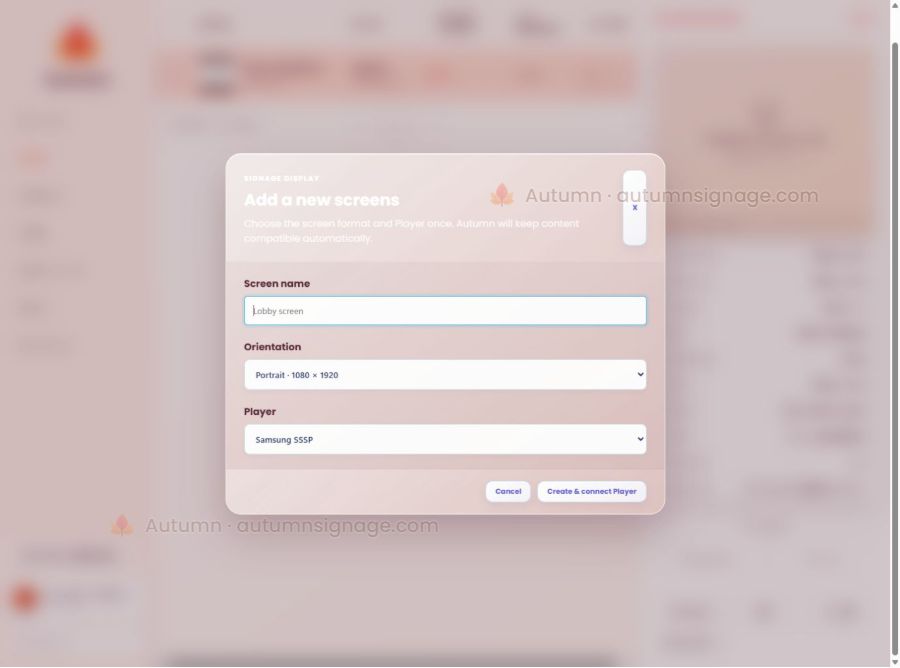
Choose Android, select the right orientation, and connect the screen to your organization.
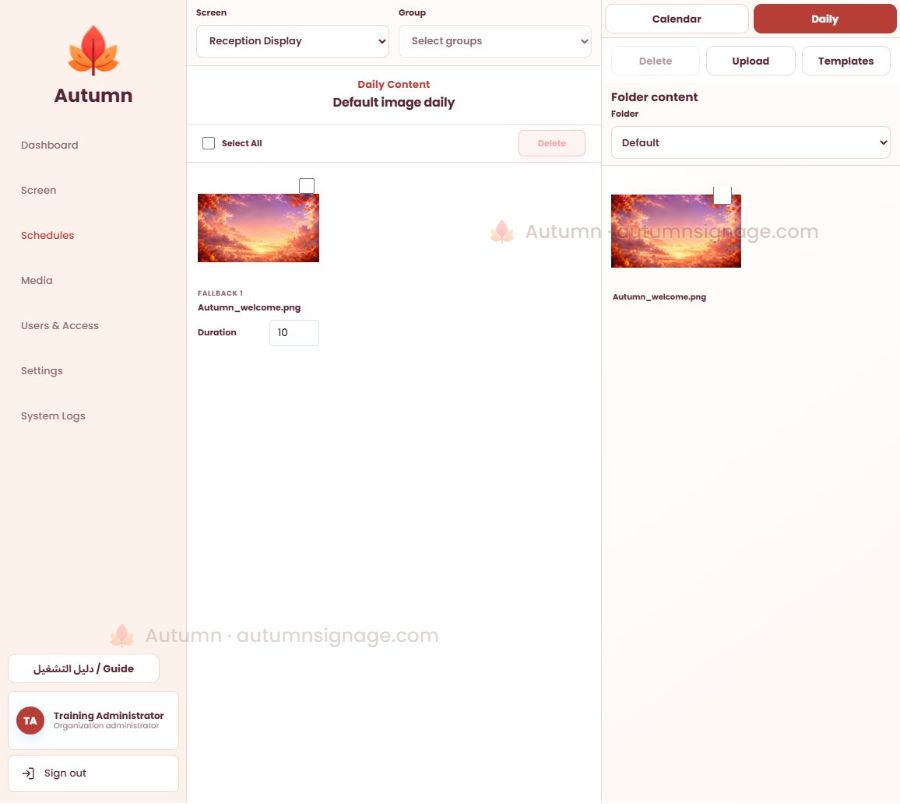
Organize daily content for a screen or a group, with the right images, video and templates.
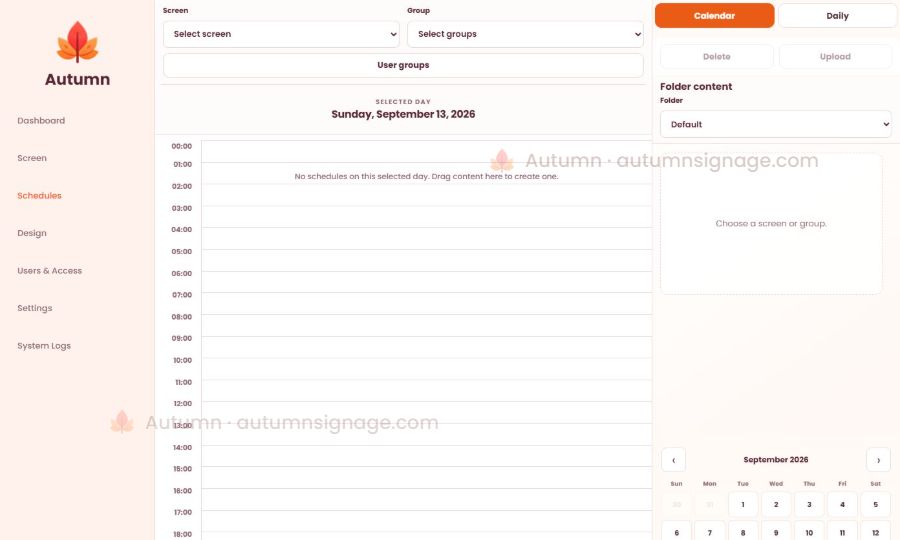
Use the calendar and timeline to choose the date and playback time, so content follows your plan.
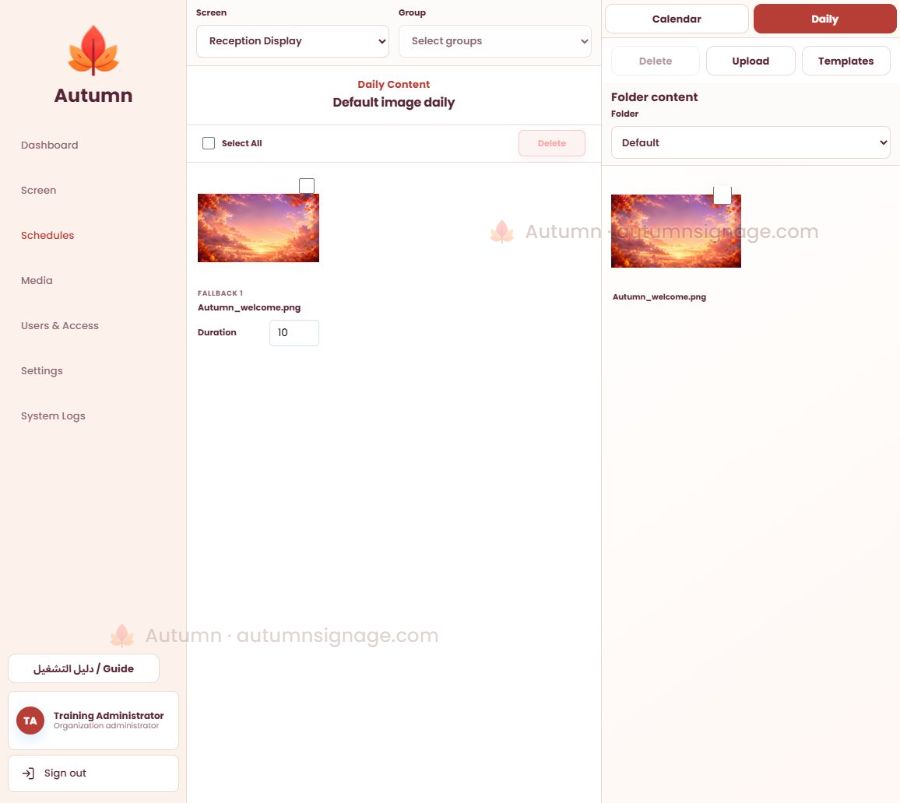
Upload images and videos into folders, then choose content compatible with the display orientation for Daily or Calendar.
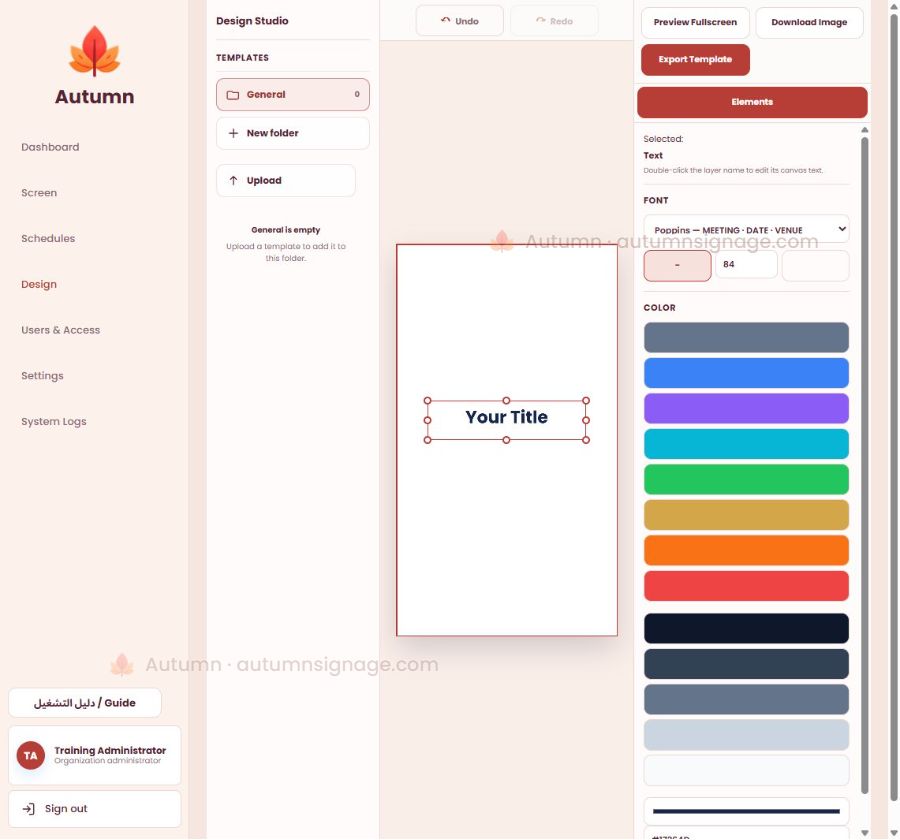
Add text, images and elements, adjust fonts and colors, then export the design or template from Autumn Design Studio.
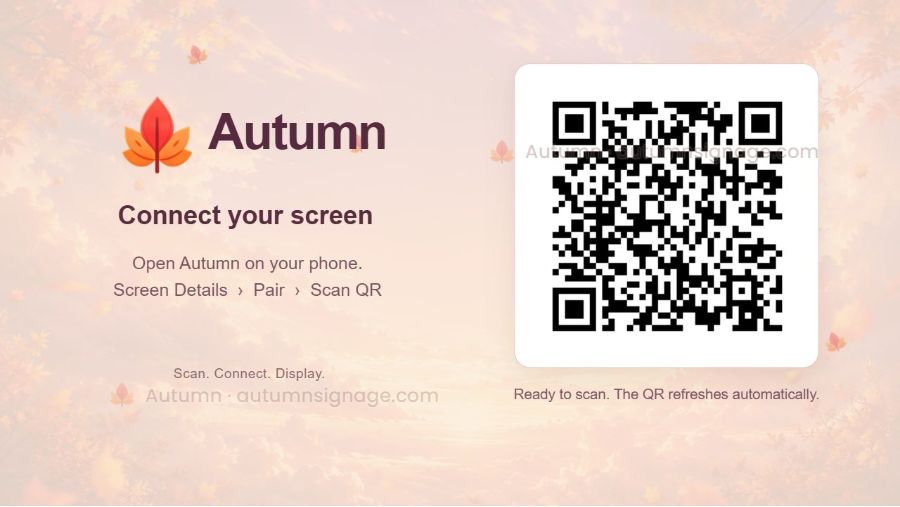
Open Pair in Screen Details, scan the player’s QR and confirm the intended screen. The displayed code belongs to an expired training session.
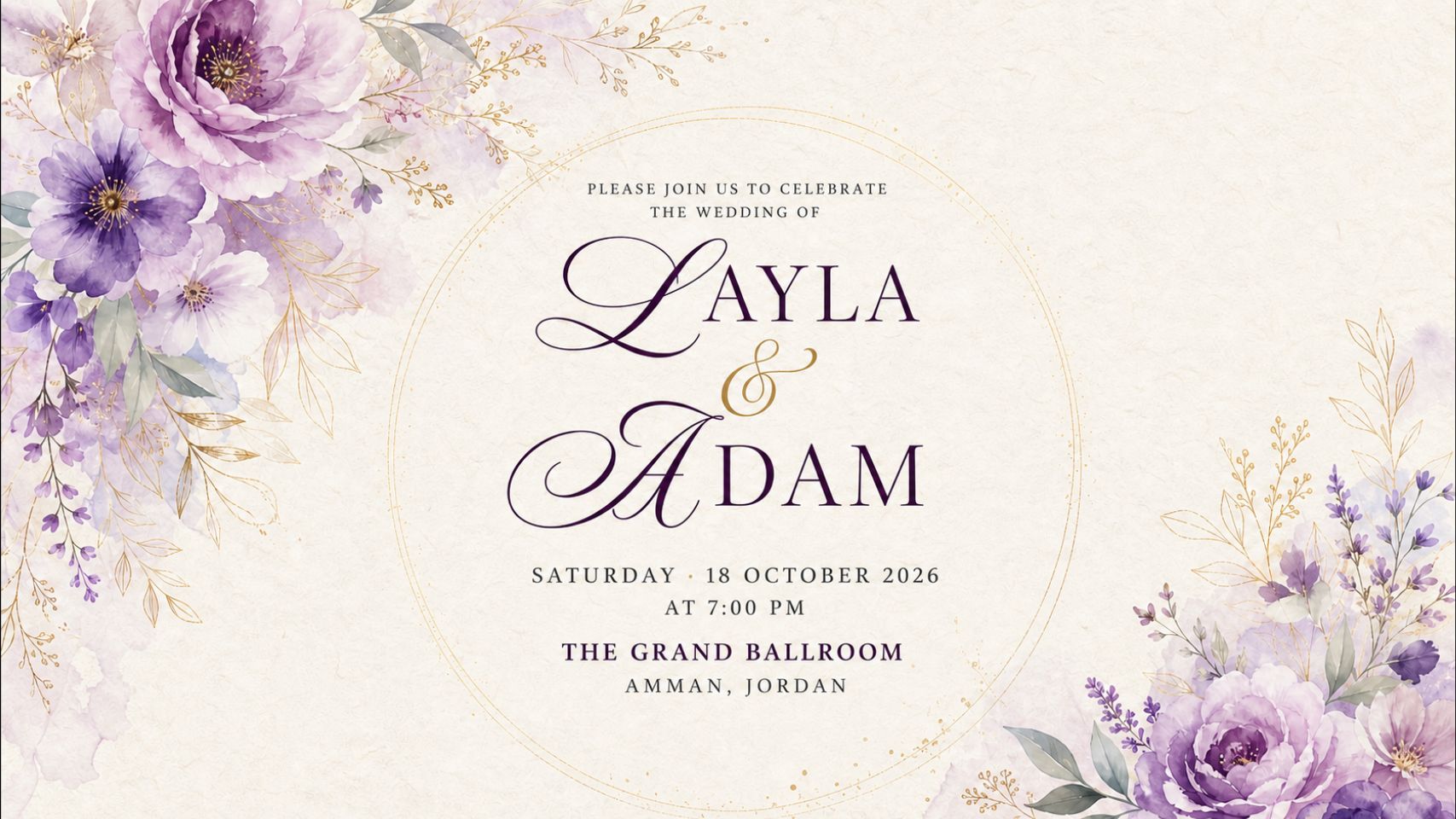
Wedding content playing in the browser player. The names and event details are a training example.
Actual screenshots from the review environment, without customer data. This is a screenshot tour, not a live screen feed.
A short tour of content, scheduling, design and playback.
Every screen, a story.Bring your images, messages and content to the display.
56 seconds · Images and captions follow your selected language · No audio. Actual training screenshots without customer data; playback is captured from a browser player.
Detailed registration, pairing and permissions guidance inside your organization account.
02HOW IT WORKS
Three clear steps. Then managing your content becomes a simple part of your day.
Add a screen, choose the device and orientation, then complete pairing.
Bring your media together and organize it in a way that works for you.
Choose a screen or group, then decide what plays and when.
03THE DETAILS MAKE THE DIFFERENCE
From your team to your displays, Autumn brings the tools together in one connected experience.
Check connectivity and the latest heartbeat, organize screens into groups, and open each display’s details from one dashboard.
Upload your media, organize it into folders, and combine images and video in one playback sequence.
Use Calendar for scheduled content and Daily for everyday programming. Target a screen or a group.
Choose templates and designs that match your screen’s orientation, then assign them to the right display or group.
Content, templates and selections follow the display’s orientation, keeping your message in the right format.
A separate workspace for each organization, with users and permissions matched to your team’s responsibilities.
The player can continue using content that has finished downloading and caching when the connection drops.
Prepare designs in Design Studio, organize your media, then choose what plays and when.
04EVERY INDUSTRY HAS ITS OWN STORY
The same management tools, with content that belongs to your business. Choose an industry for example uses.
Company news, team communications and visitor information. Organize content by branch or floor.
Present services, campaigns and guidance in your branches, with your organization’s own content and permissions.
Showcase products and seasonal campaigns. Schedule content for each store or screen group.
Display menu artwork and promotions, with different content scheduled for breakfast, lunch and evening.
Dedicate your hotel’s displays to welcome messages, amenities and events inside its own organization workspace.
05YOUR DISPLAY STARTS HERE
Download the Android app and connect a new display to your organization.
Standard playback does not require the management agent. Automatic startup and device controls need additional setup depending on the model. Contact support before replacing an older installation to preserve pairing and content.
06PRICING THAT FOLLOWS YOUR SCREENS
Try 5 screens for 14 days. No card required. Includes an Autumn watermark.
A clear monthly base price for each display. Calculate your screen count and start your online registration.
per screen / month
From 1 to 1,000 screens
Estimate in US dollars, before applicable taxes. The final total is shown before you confirm payment.
After 14 days, trial playback stops and your screens and content are preserved. Upgrading is optional; the trial needs no card and makes no automatic charge. To cancel a paid subscription before renewal, open Subscription, then Manage billing. Cancellation stops future charges; refunds follow the refund policy.
The app is available for Android 5.0 or later. Playback and automatic startup capabilities vary by device; test your model before setting up the remaining displays.
Yes. You can organize images and video together and schedule playback for the screen or group you choose.
The player can continue with content that has already finished downloading and caching. Publishing new changes and monitoring the screen require a connection.
Each organization has its own workspace, users and permissions. Central platform ownership is separate from organization administration.
Register and verify your email to start a 14-day trial for 5 screens with an Autumn watermark. No card is required and no payment is taken automatically. To continue with a paid subscription, choose your screen count in Subscription and complete checkout at $15 per screen per month before tax. Your screens and content are preserved.
Autumn
AUTUMN SIGNAGE
انشر الصور والفيديو، نظّم مواعيد العرض، وتابع شاشات Android من لوحة تحكم خاصة بمؤسستك.
ابدأ اشتراككاشتراك شهري حسب عدد الشاشات
$15لكل شاشة / شهر
يتجدد الاشتراك شهريًا. تظهر أي ضرائب مطبقة والمبلغ النهائي قبل تأكيد الدفع.
حساب مؤسستك
إدارة شاشات مؤسستك باشتراك شهري حسب عدد الشاشات.
عند انتهاء ١٤ يومًا يتوقف عرض التجربة وتبقى الشاشات والمحتوى محفوظة. المتابعة المدفوعة اختيارية؛ لا بطاقة ولا خصم تلقائي خلال التجربة. لإلغاء اشتراك مدفوع قبل تجديده، ادخل إلى الاشتراك ثم إدارة الفوترة. الإلغاء يوقف الرسوم المستقبلية، والاسترداد يخضع لسياسته.
أكمل اشتراكك في صفحة الدفع الآمنة. يتم تفعيل مؤسستك بعد وصول تأكيد الدفع.
إذا أكملت الدفع، قد يستغرق وصول التأكيد قليلًا. هذه الصفحة تتحقق تلقائيًا.
الدخول إلى مؤسستكجاري التحقق من توفر التسجيل…